
Designing a Digital Future for HSB
Four years of service design work focused on digital transformation — creating value through efficiency, accessibility, and transparency for HSB members.
ROLE
UX · Service · Business Design
CLIENT
HSB
FOCUS
Digital Tranformation
PERIOD
2019-2023
BACKGROUND
Moving HSB toward a more digital way of working
What happens when governance, finance, and decision-making are redesigned from the ground up — for a digital-first world?
Between 2019 and 2023, I partnered with HSB, one of Sweden’s largest housing cooperatives, to transform how their organisation governs, reports, and closes financials.
From early discovery through to delivered products, I worked as the sole UX Designer with full ownership of the experience. Collaborating closely with product owners, internal teams, and end users, I ensured that each solution created tangible value across the organisation.
The work required navigating complex processes, regulatory demands, and deeply rooted ways of working — while making it simple, usable, and scalable.
In close partnership with developers and a requirements specialist, we turned fragmented workflows into cohesive digital products that reshaped how HSB operates.
DESIGN CONCEPTS
Three Areas
of Transformation
01
Annual Report
From static PDF to digital storytelling
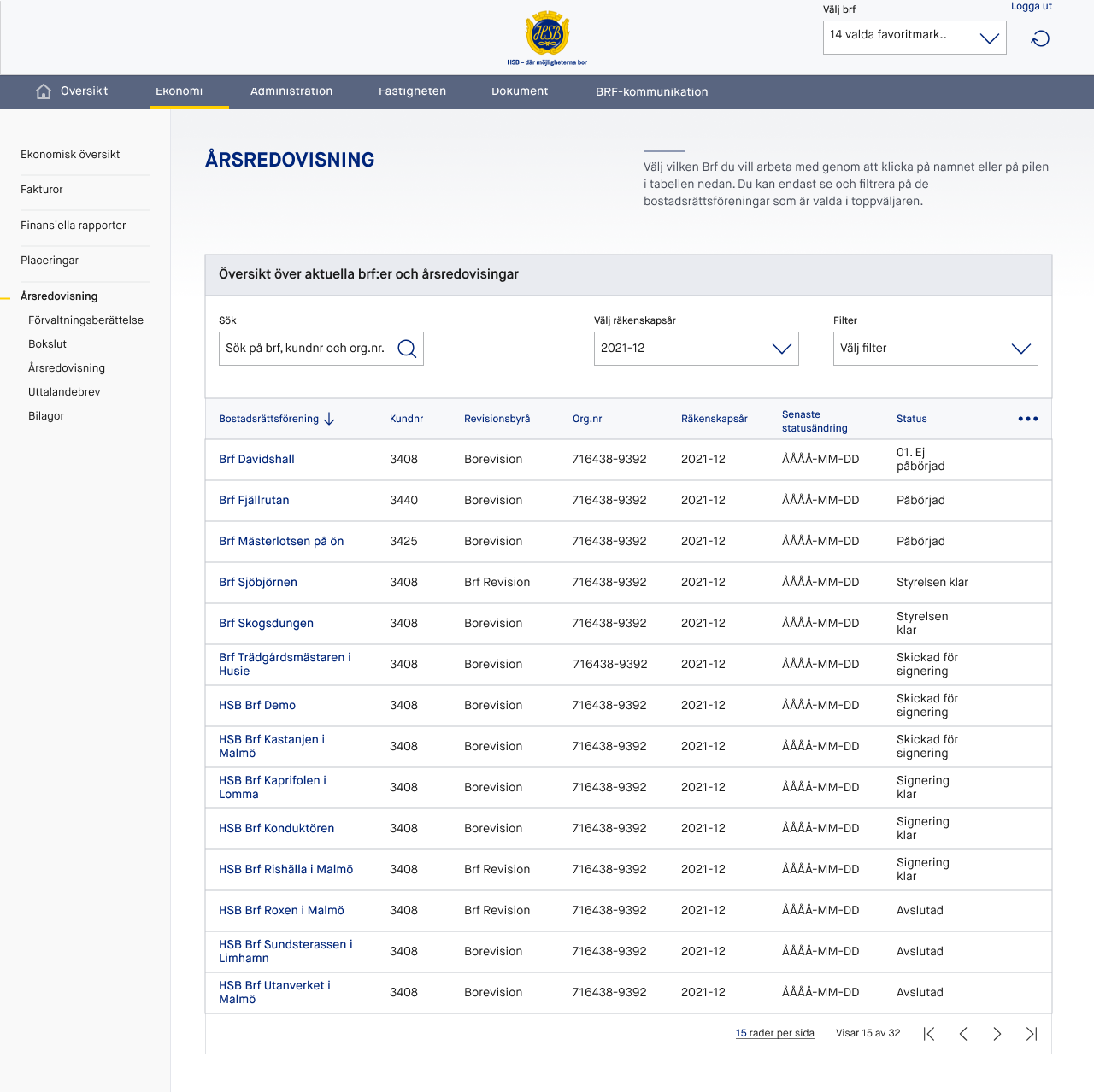
Redesigned the annual report as an accessible, navigable experience for HSB members. The new format replaced static PDFs with structured, readable content that highlighted key milestones, financial performance, and cooperative impact — making governance genuinely understandable for all members.
Key Outcomes
- Digital report with clear information hierarchy
-
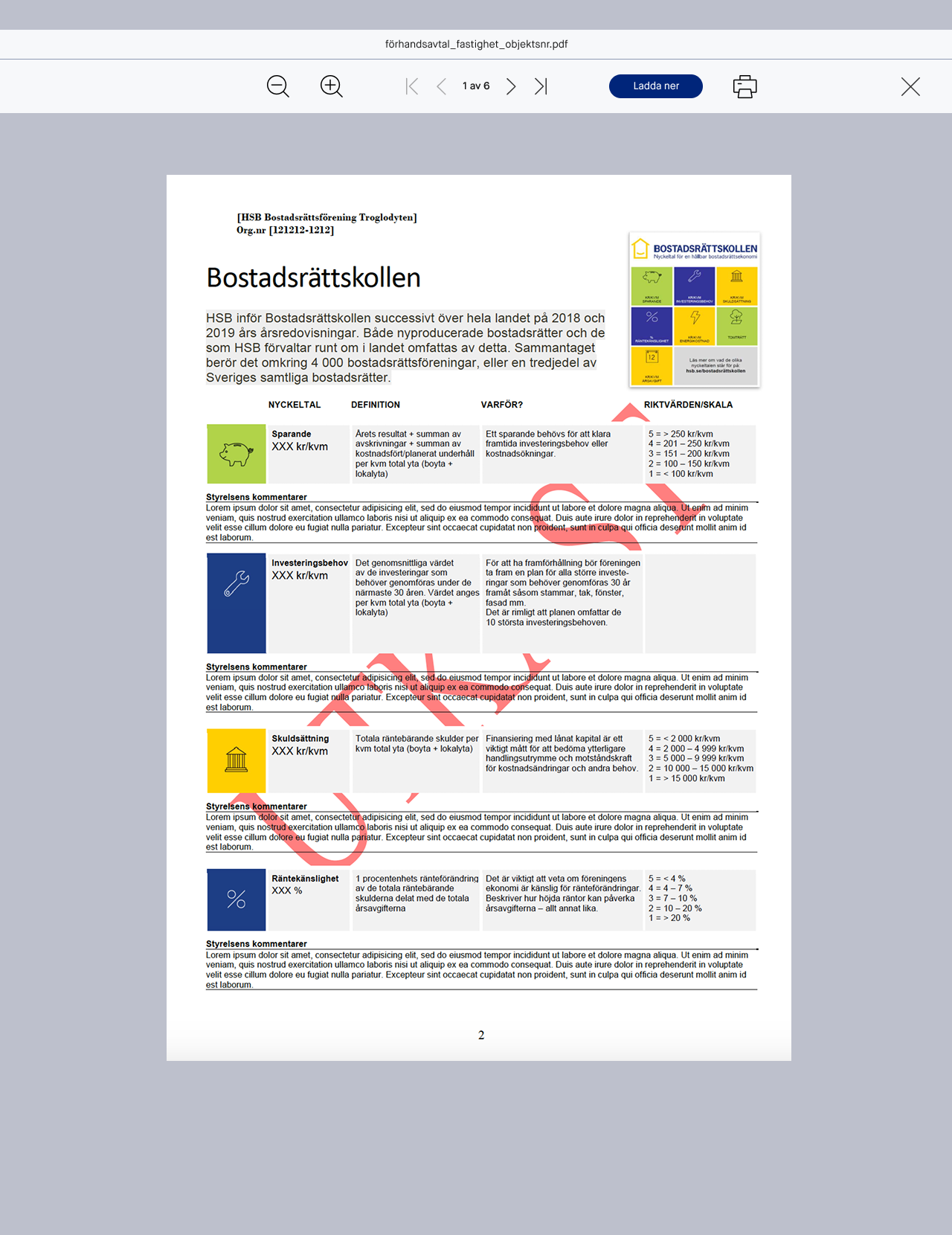
Bostadsrättskollen key metric dashboard for members
-
Improved readability for non-financial stakeholders
ROLE
Product Designer / UX-Designer
SCOPE
Platform design, system architecture, UX strategy
DOMAIN
Regulated financial and governance workflows
STAKEHOLDERS
Product Owner, Business Stakeholders, Economists, Board Members, Auditors
A Fragmented and Manual Process
Creating an annual report for a housing association is a complex, multi-step process involving:
- Board members
- BRF Economists
- Internal and external auditors
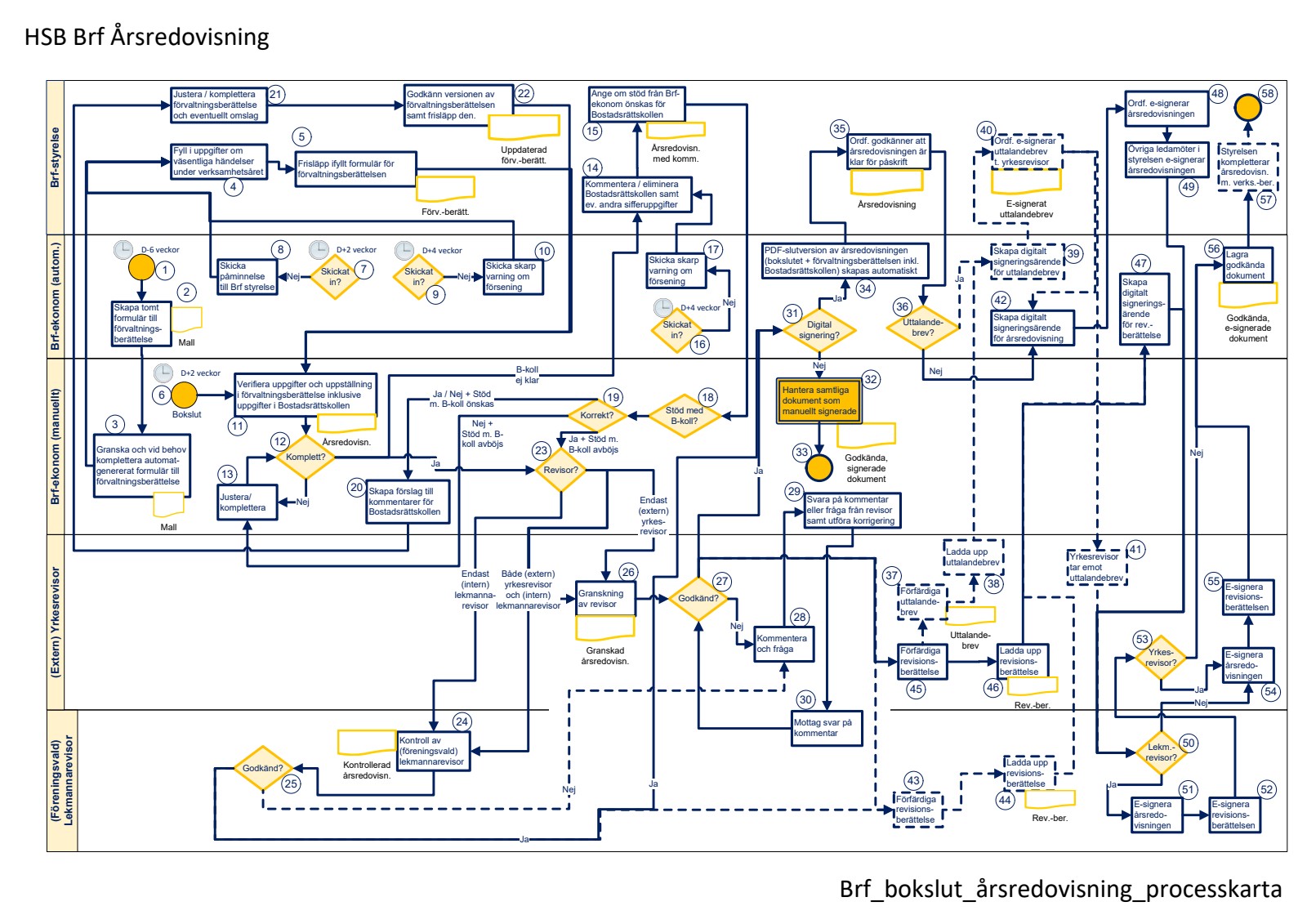
Historically, the process was document-based, email-driven, and fragmented across tools. Users relied on PDFs, Excel files, and external platforms to complete their work. The system did not support the process — users had to work around it.

A High-Pace, Iterative Design Process
The pace of this project demanded a lean and adaptive design process. With multiple products shipping in parallel, there was no room for lengthy discovery phases — we had to move fast while maintaining quality and usability.
I established a repeatable design cycle that kept momentum high and feedback loops tight:
01
Sketch & Explore
Rapid concept exploration in Sketch to define structure and layout
02
Prototype
Interactive prototypes built in InVision for realistic walkthroughs
03
User Testing
Testing interface patterns, copy, and flows with real users
04
Dev Handoff
Structured handoff with specifications, assets, and interaction notes
05
Pilot Group
Deploying to a selected BRF test group for real-world validation
06
Iterate
Collecting insights, redesigning, retesting, and shipping again
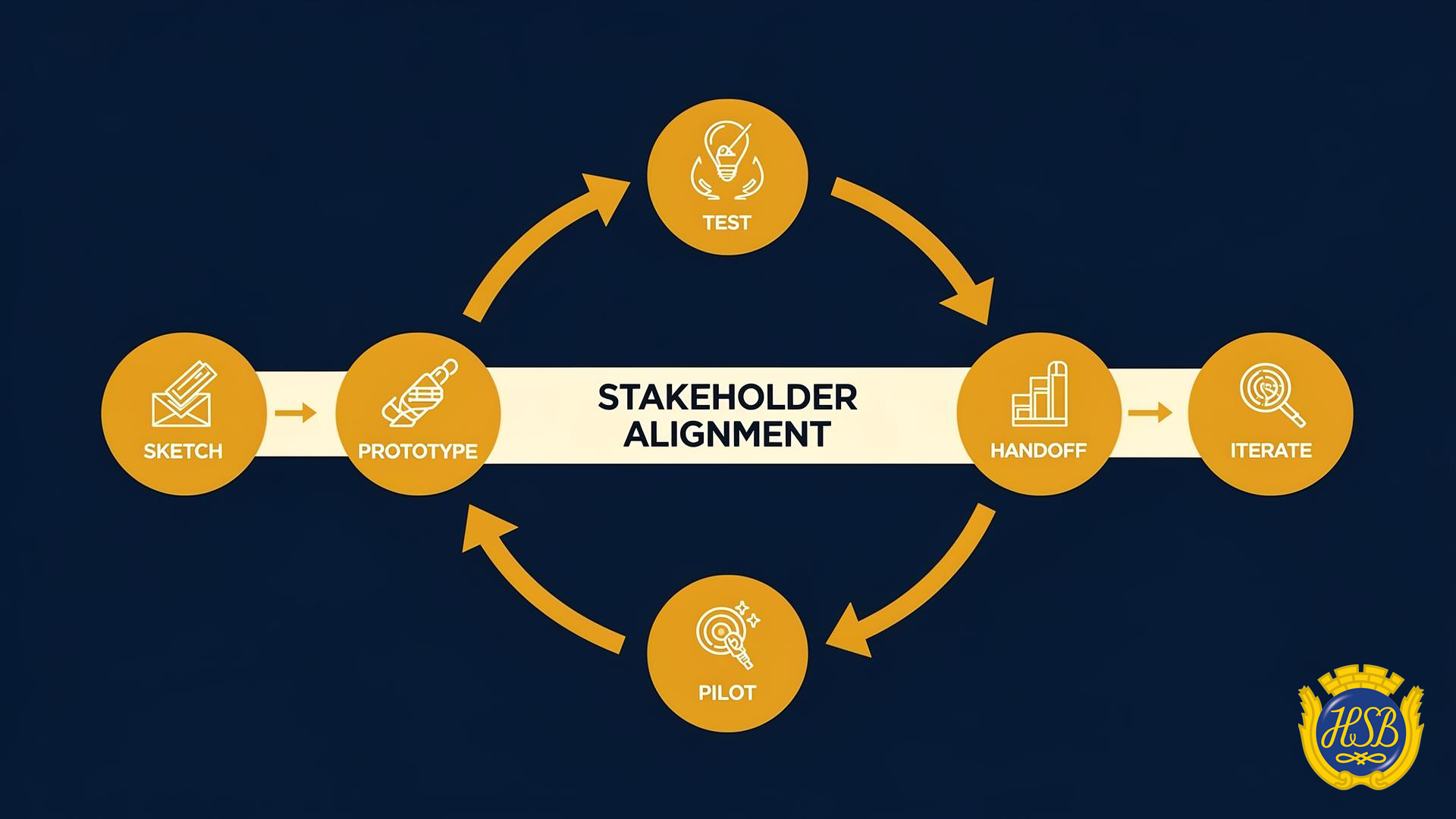
Continuous design loop: Sketch → Prototype → Test → Handoff → Pilot → Iterate
This wasn't a linear process — it was a continuous loop. Each release informed the next design cycle, and the pilot group acted as a real-world stress test before broader rollout.
Aligning Stakeholders Across Regions
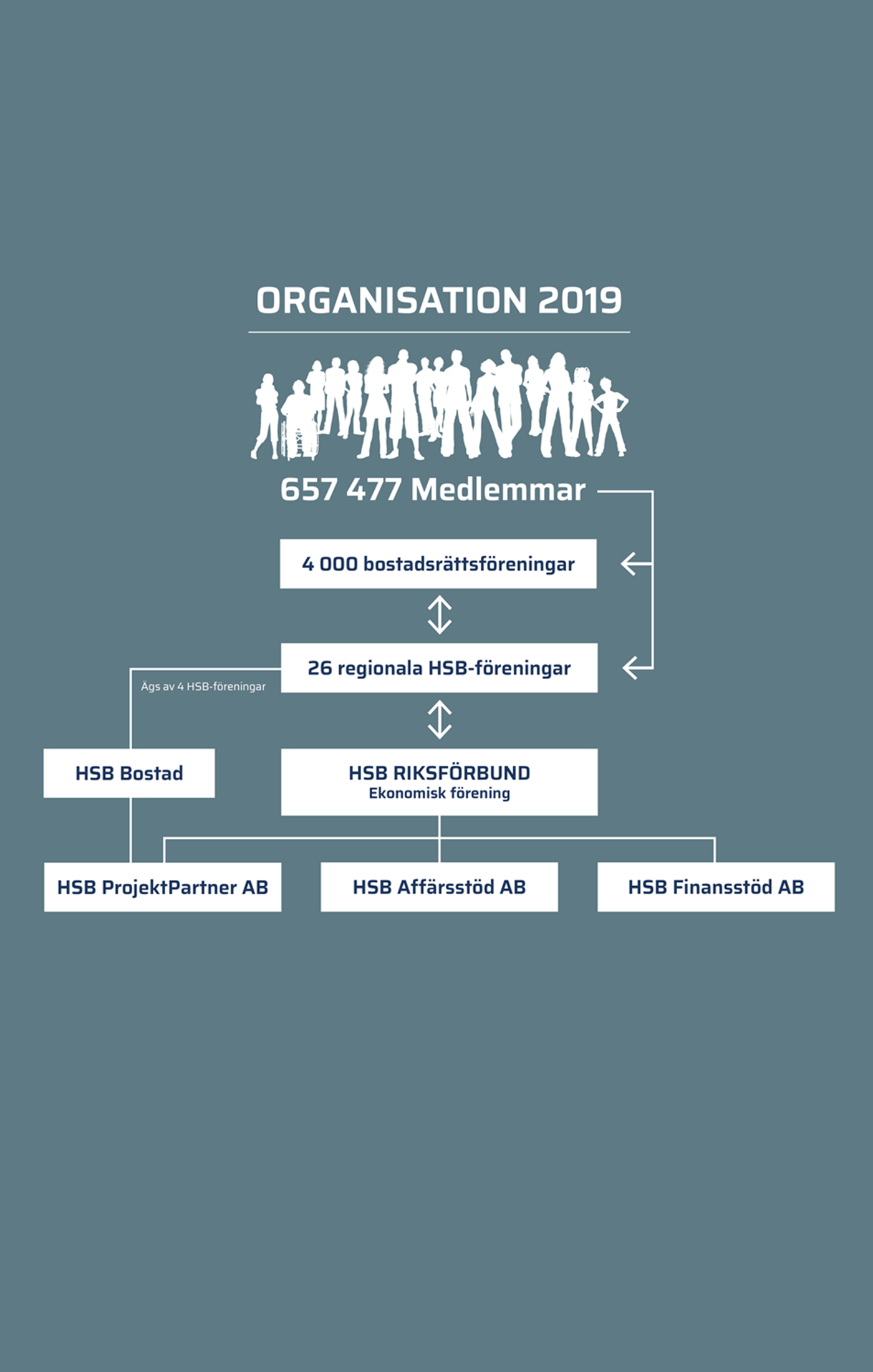
One of the most complex challenges was not the interface — it was the organisation. HSB operates through regional offices, each of which had developed their own processes, templates, and interpretations of how annual reporting should work.
- Building a single product meant navigating conflicting workflows, deeply held habits, and regional autonomy. The design process required:
- Workshops with stakeholders from multiple regions to map existing processes and surface differences
- Identifying which workflows could be standardised and where regional flexibility was essential
- Designing a configuration layer that gave regions autonomy without fragmenting the product
- Building consensus through prototypes — showing rather than telling
This wasn't a linear process — it was a continuous loop. Each release informed the next design cycle, and the pilot group acted as a real-world stress test before broader rollout.
From Documents to a Product
The annual report is not just a document. It is a governance process with multiple stakeholders, dependencies, and deadlines.
Instead of designing screens, I approached it as a product and service ecosystem.
A Living, Editable Product
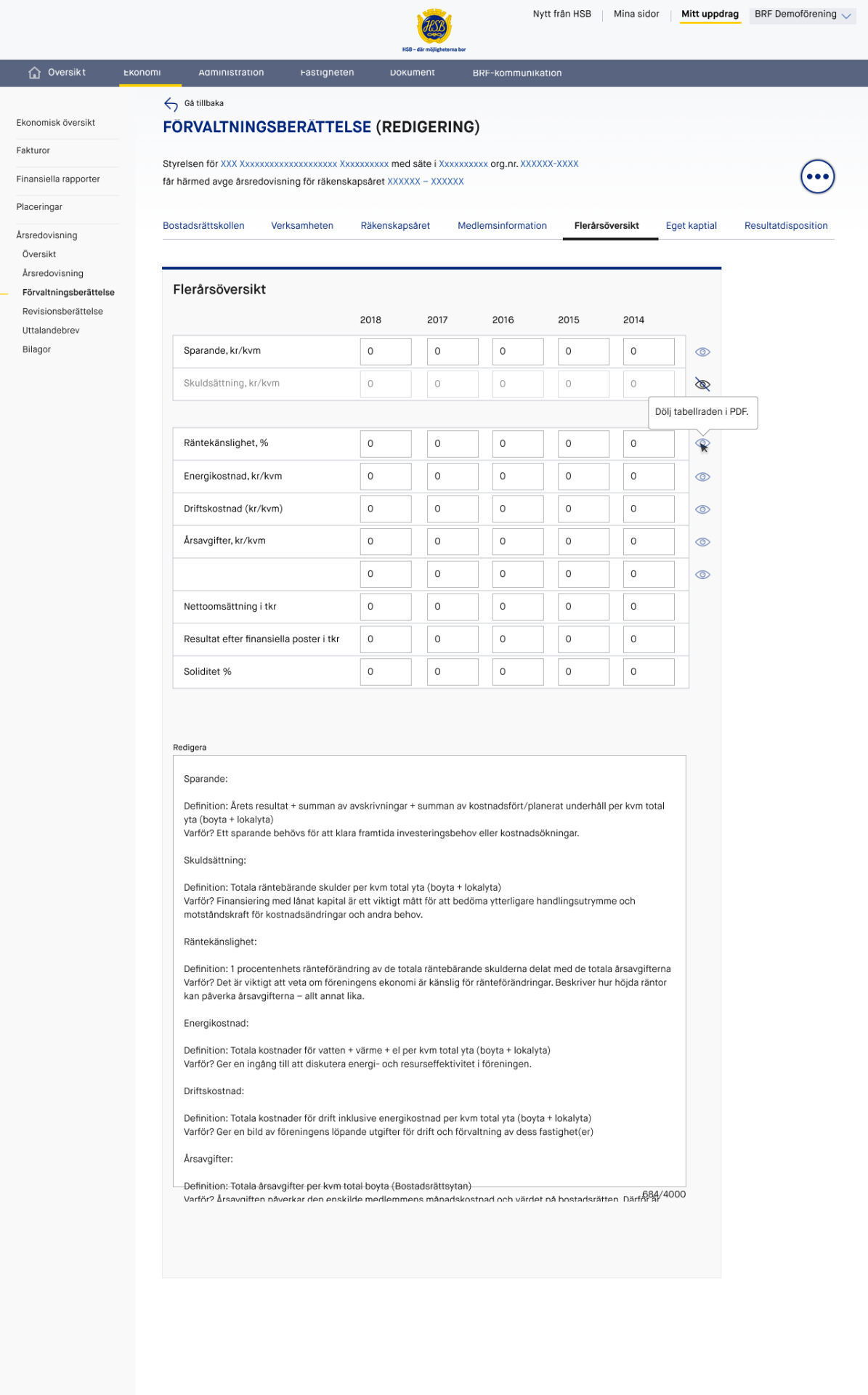
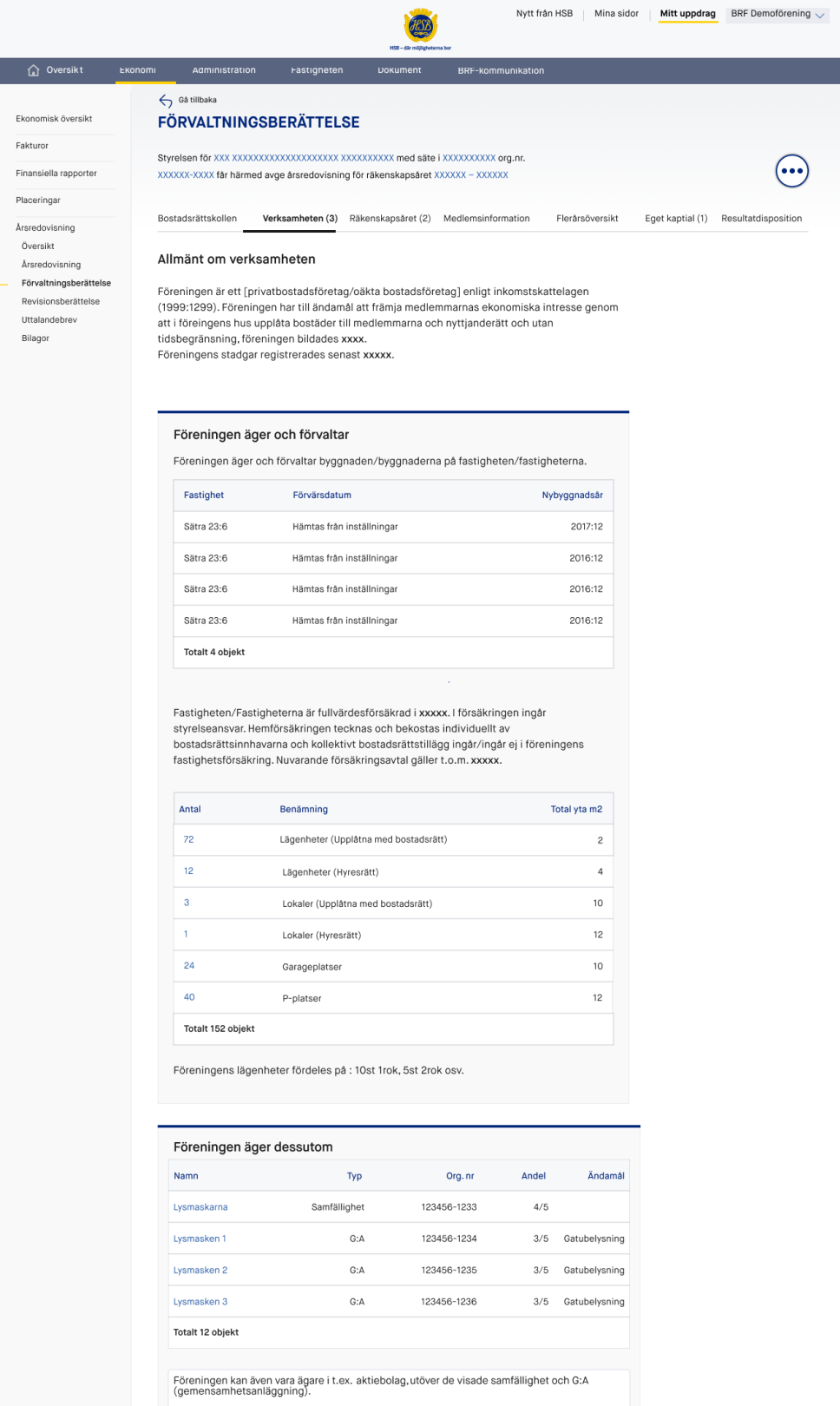
I redesigned the experience from static documents into a fully editable interface with structured sections, autosave, and dynamic content. The annual report became a living product, not a document.
The Management Report is a core part of the annual report, covering the association’s operations, financial development, and key events over time. It includes sections such as business overview, significant events, financial performance, and a multi-year overview of key metrics.
To make this structured content easier to manage, I designed the interface as a tab-based system. Each section became a dedicated, editable view, allowing users to navigate, review, and update information efficiently.
The tabs included:
- Housing Association Overview (Bostadsrättskollen)
- Business Overview (Verksamheten)
- Financial Year (Räkenskapsåret)
- Member Information (Medlemsinformation)
- Multi-year Overview (Flerårsöversikt)
- Equity (Eget kapital)
- Proposed Distribution of Earnings (Resultatdipostion)
Predefined templates ensured consistency and completeness, while flexible editing allowed users to add custom values, tables, and content beyond the standard structure.
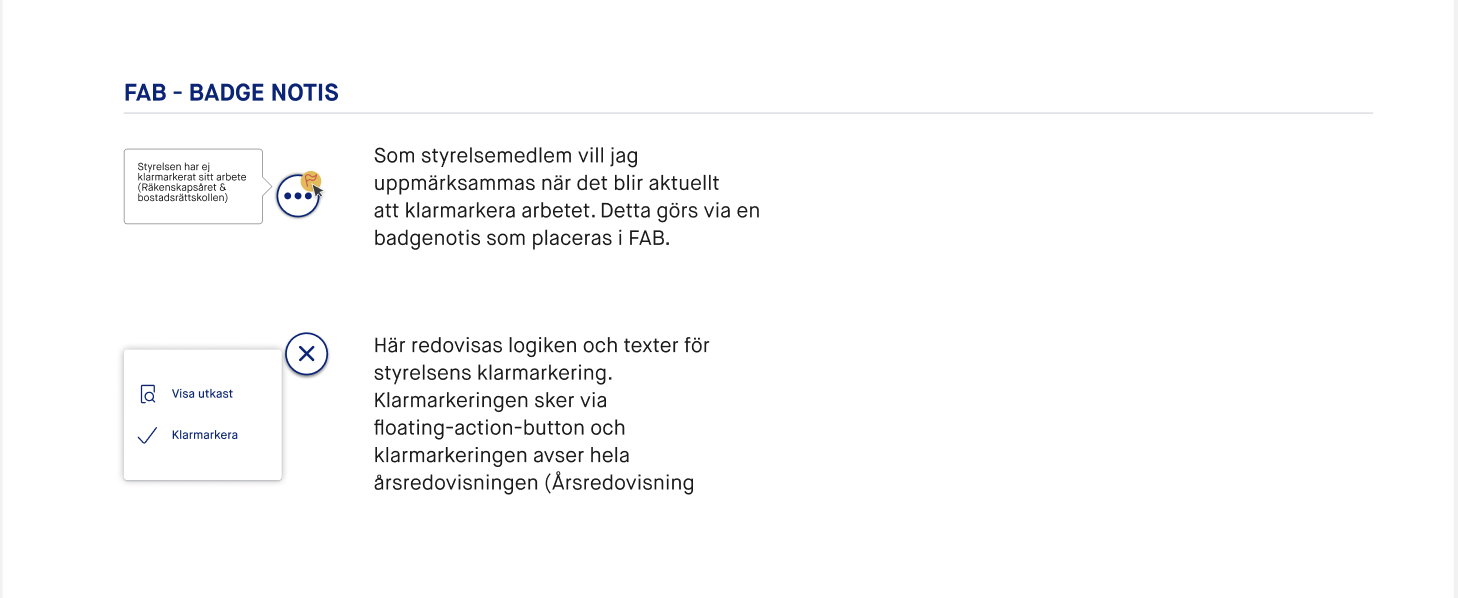
Floating Action Button (FAB) as a Control Layer
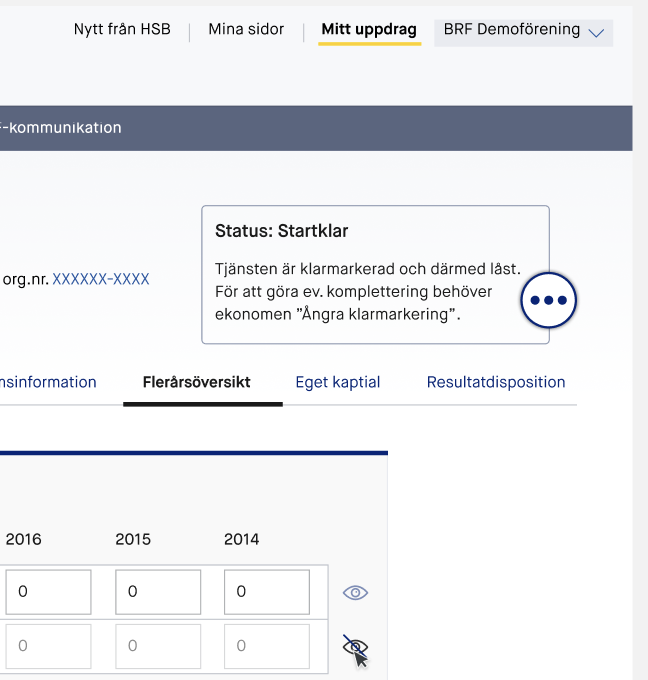
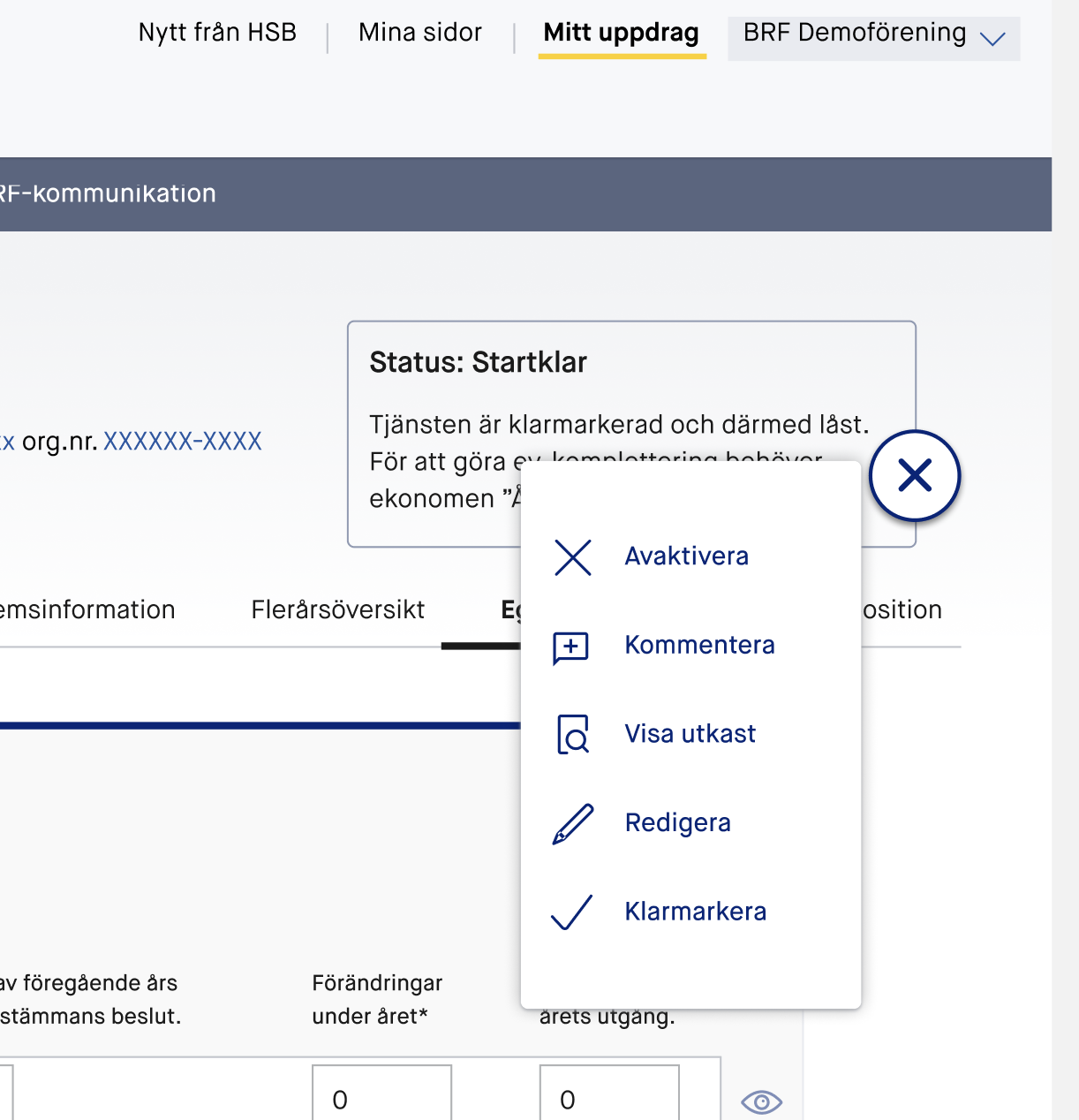
To manage the growing number of actions across the workflow, I introduced a floating action button (FAB) as a central interaction pattern. This was initially a point of discussion, as the pattern was relatively unfamiliar to many users and stakeholders, requiring a strong design rationale to move forward.
The goal was to reduce interface clutter and shift secondary actions away from the primary content. Instead of exposing all available actions directly in the UI, the FAB acted as a contextual control layer, surfacing only relevant actions based on the current state and user role.
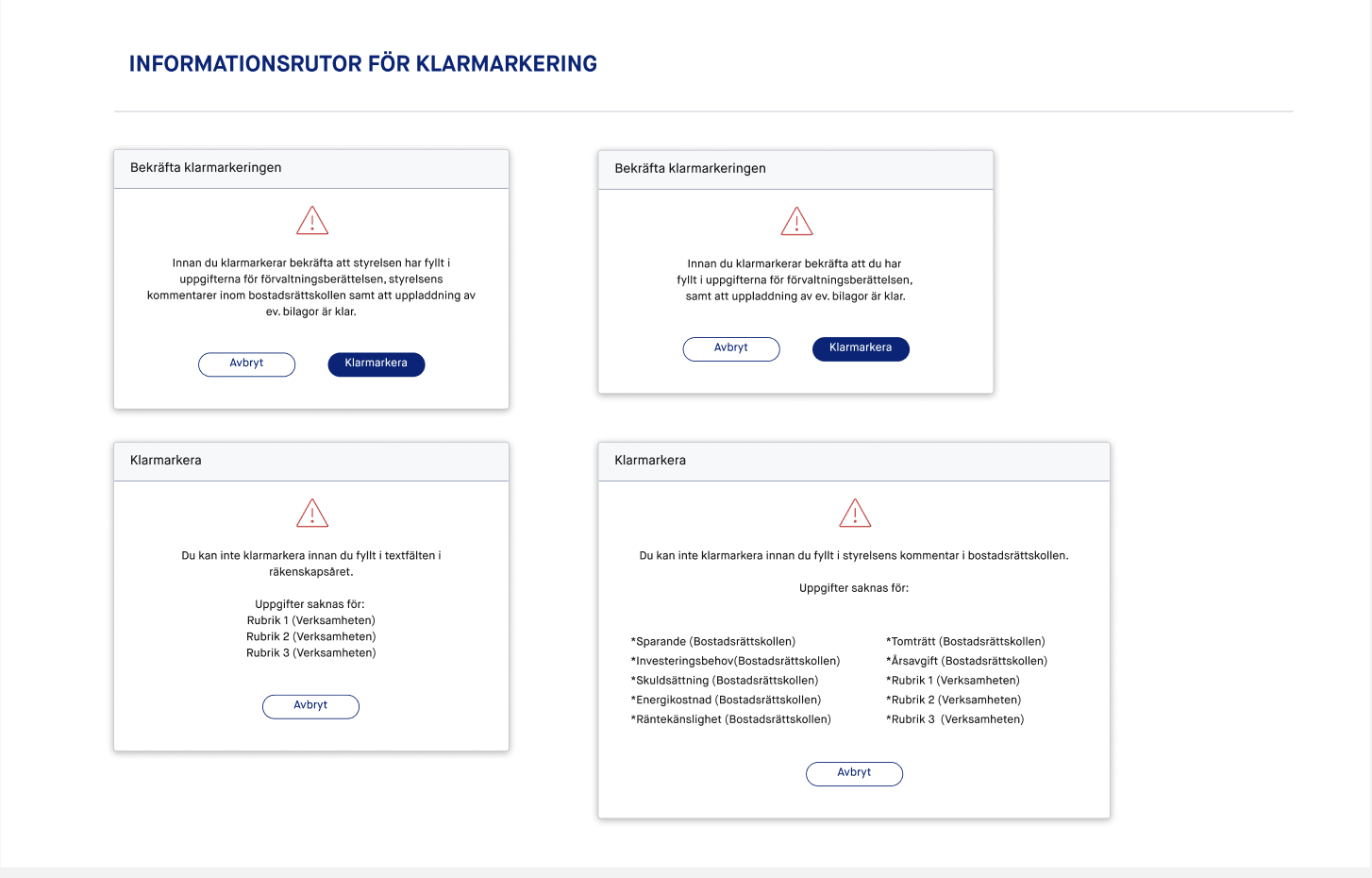
Each state controls access, actions, and transitions. Actions like “Complete step” move the process forward and unlock the next phase.
By consolidating actions into the FAB, we were able to:
- Introduce state-based actions without overwhelming the interface
- Support contextual notifications and prompts
- Guide users toward the next logical step in the process
- Reduce cognitive load by removing unnecessary UI elements
Over time, the pattern proved highly effective. It not only simplified the interface, but also strengthened the overall flow by combining actions, guidance, and feedback into a single, consistent interaction point.
Guiding Users Through the Entire Process
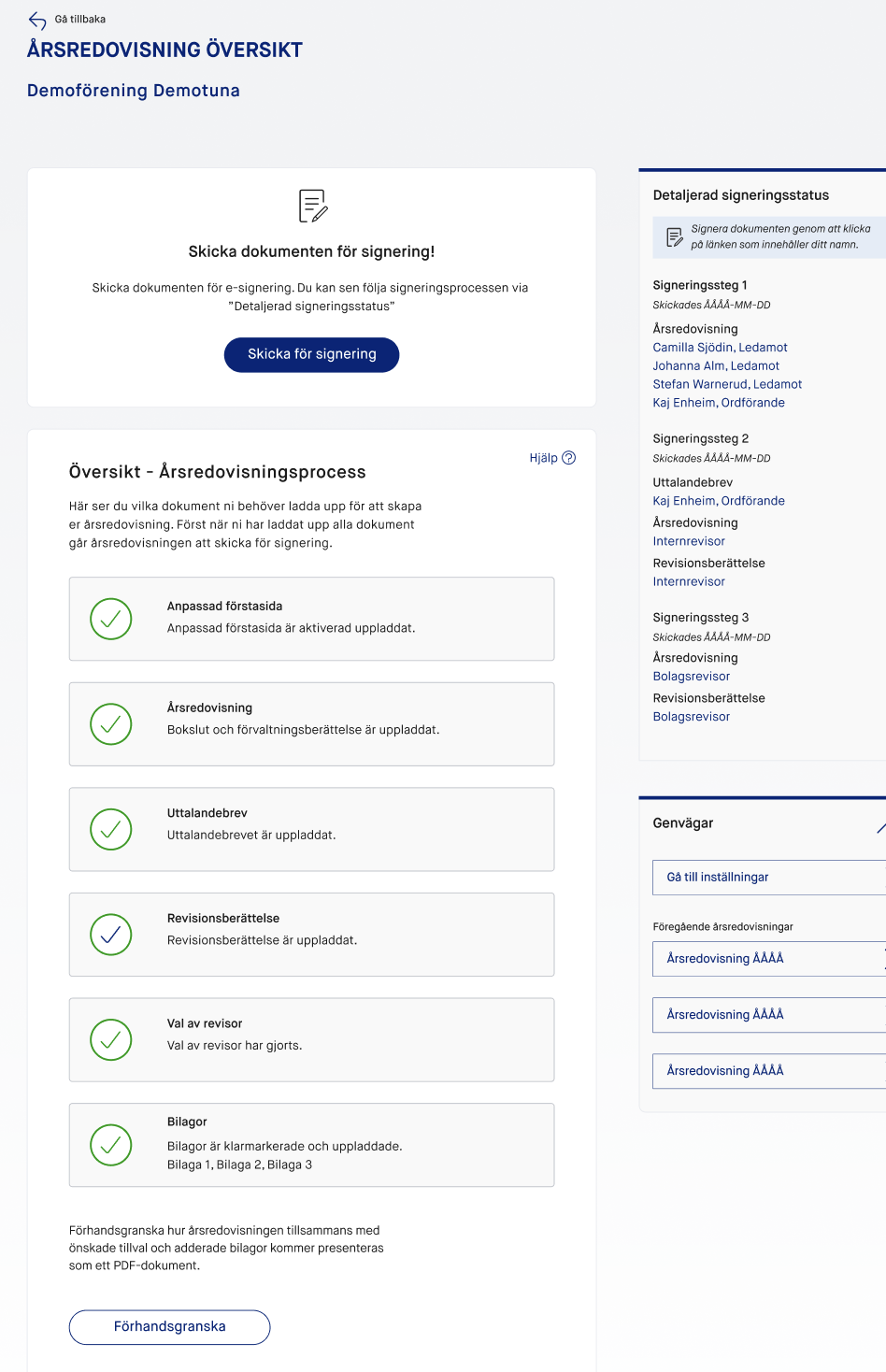
The Annual Report experience was designed to guide users step by step through a complex, multi-stakeholder process. Instead of relying on manual coordination, the system structured the workflow into clear phases with defined roles, statuses, and actions.
Each step in the process was connected to a specific state, making progress visible and reducing uncertainty. Users could always see what had been completed, what was in progress, and what actions were required next.
Role-based notifications
To ensure momentum, the system introduced role-based notifications. Each stakeholder was prompted only when their input was needed:
- Administrators initiated the process and managed structure
- Board members reviewed and contributed content
- Auditors validated financial and compliance-related sections
Notifications were triggered based on status changes, removing the need for manual follow-ups and email coordination.
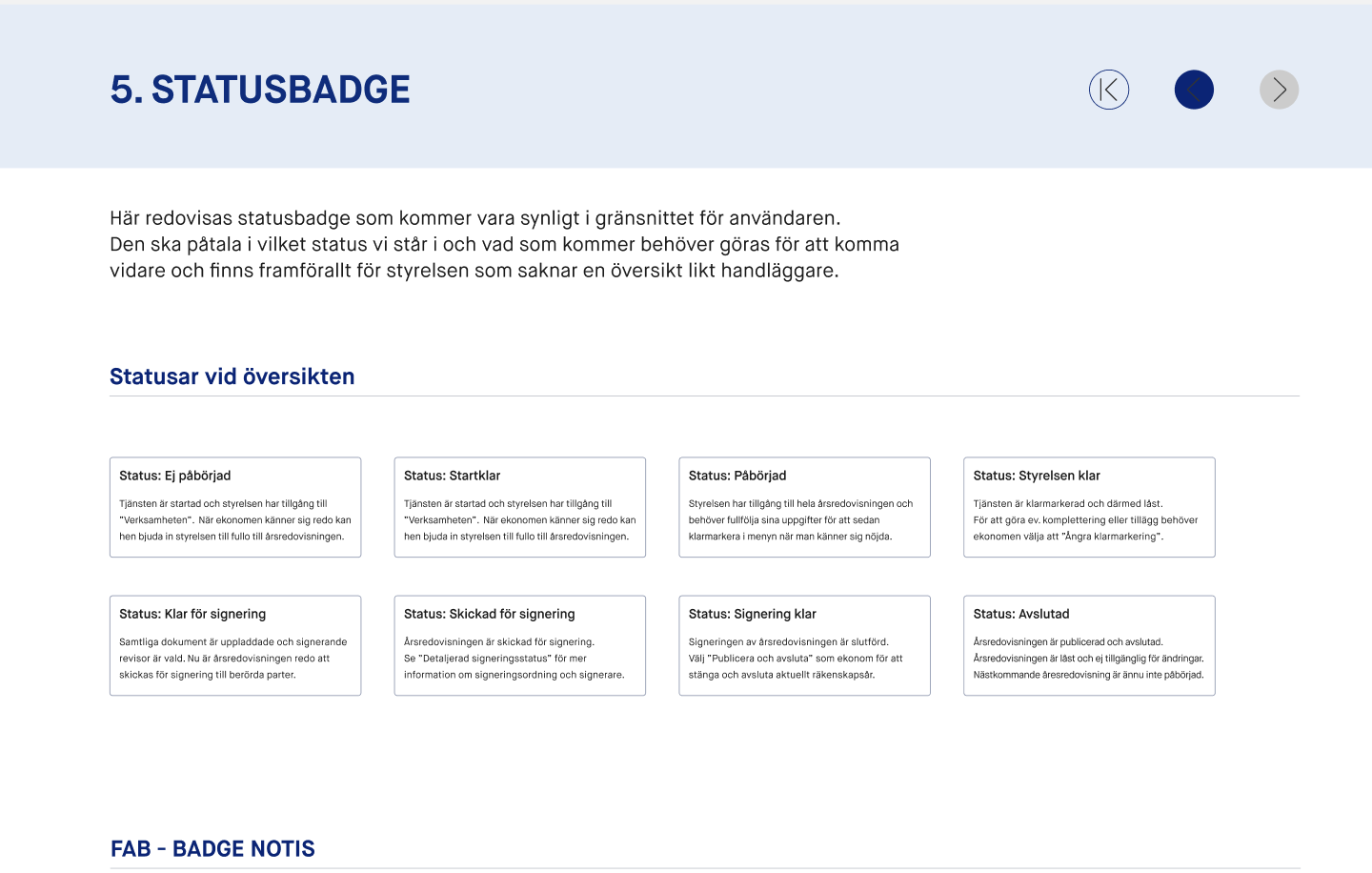
Status-driven workflow
The report moved through a set of clearly defined states:
- Not Started
- In Progress
- Ready for Review
- Sent for Approval
- Signed / Completed
These statuses acted as both control mechanisms and communication tools, aligning all participants around a shared understanding of progress.
Step-by-step navigation
The interface provided a structured overview of the entire report, divided into sections that could be accessed and edited individually. A progress-based navigation system allowed users to:
- Move between sections without losing context
- See completion status per section
- Identify missing or incomplete data
Rather than working in isolation, users operated within a guided flow where each step built on the previous one.
Different Users, One System
The system supports multiple stakeholders within the same workflow, adapting the experience based on role. Board members, accountants, and external auditors all work in the same system, but with tailored views, actions, and responsibilities.
Each user is presented with relevant information, clear ownership, and defined next steps. At any point, it is visible who is responsible and what needs to happen next, reducing ambiguity and manual coordination.
To maintain progress, the system triggers notifications both in-platform and via email when delays occur. This helps prevent bottlenecks and keeps the process moving.
External auditors work across multiple clients and are given a consolidated overview of all ongoing reports. A step-based interface allows them to track status, review content, and manage sign-offs efficiently.
The result is a shared system with role-specific clarity, where each user understands their responsibility and how to move the process forward.
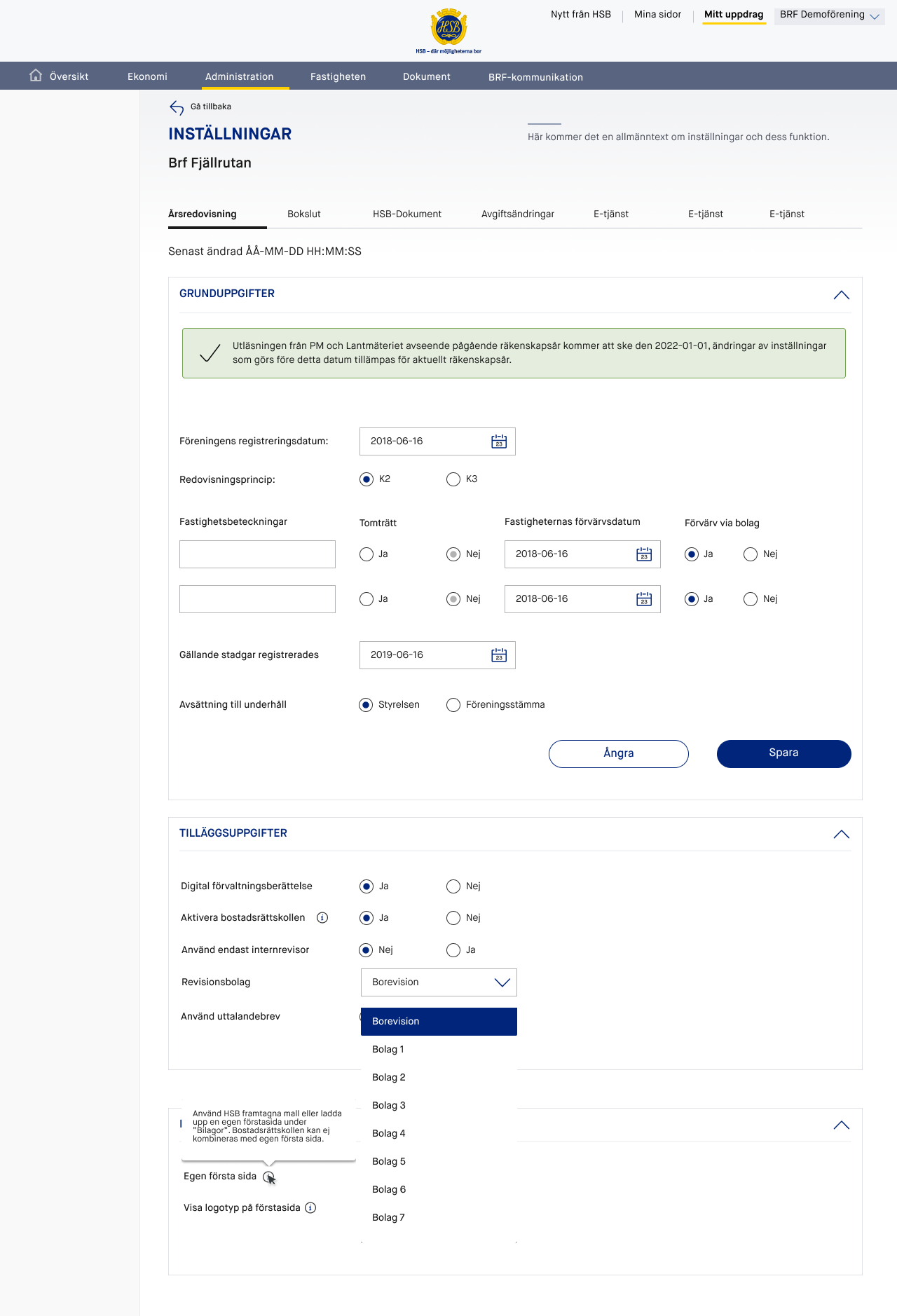
One Product, Multiple Use Cases
A configuration layer allowed the system to adapt to different regional needs and workflows.
At the start of the process, key decisions such as accounting standard (K2/K3), auditor setup, property data, and optional components like custom cover pages, glossary, and Bostadsrättskollen are defined. These settings don’t just store preferences, they actively shape the structure, content, and flow of the entire report.
Based on this configuration, the system dynamically adjusts what sections are included, who is responsible, and how the signing process is executed. This ensures that each association follows the correct logic from the outset, without manual adjustments or parallel tools.
By separating configuration from execution, one product can support multiple use cases while maintaining a consistent and guided user experience.
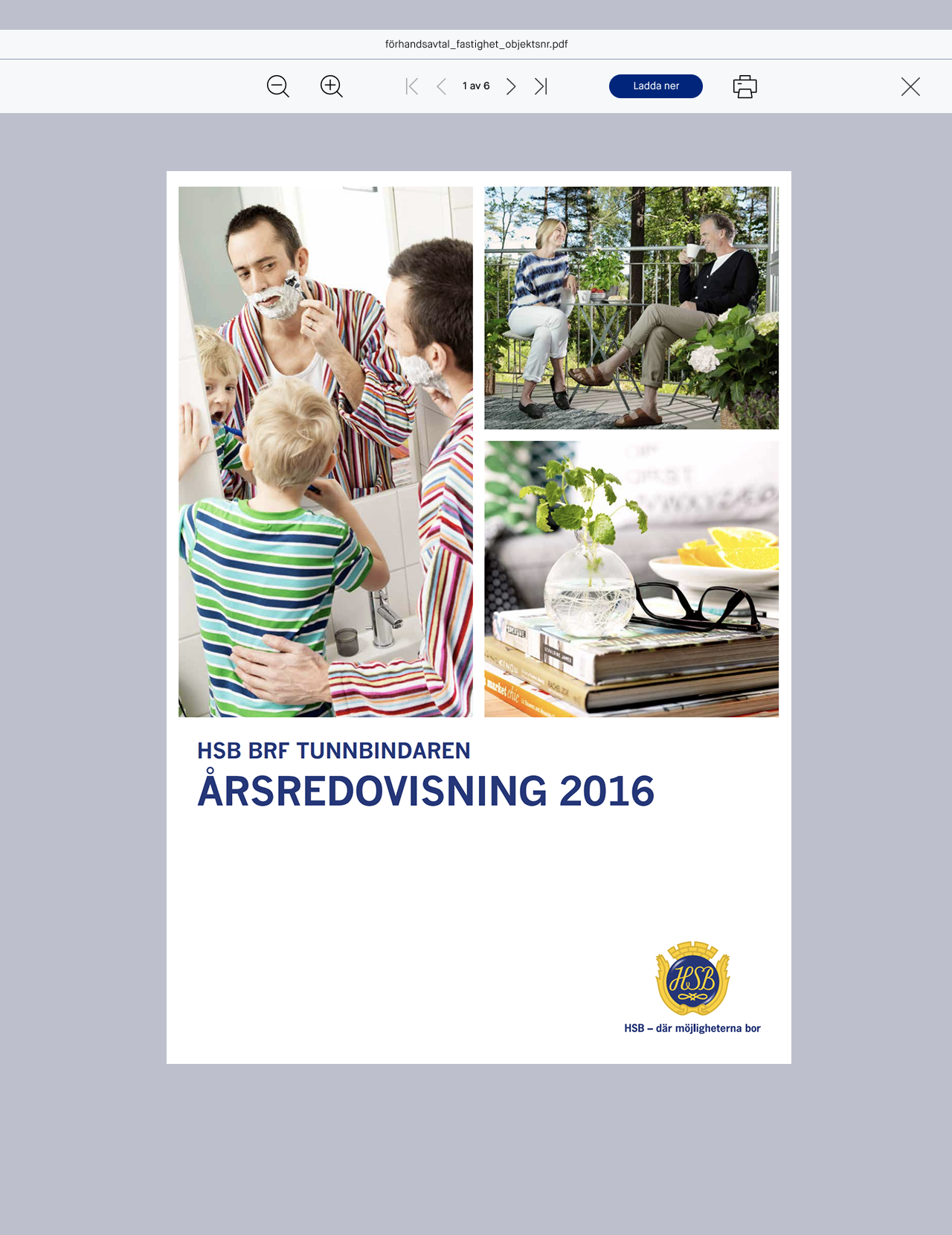
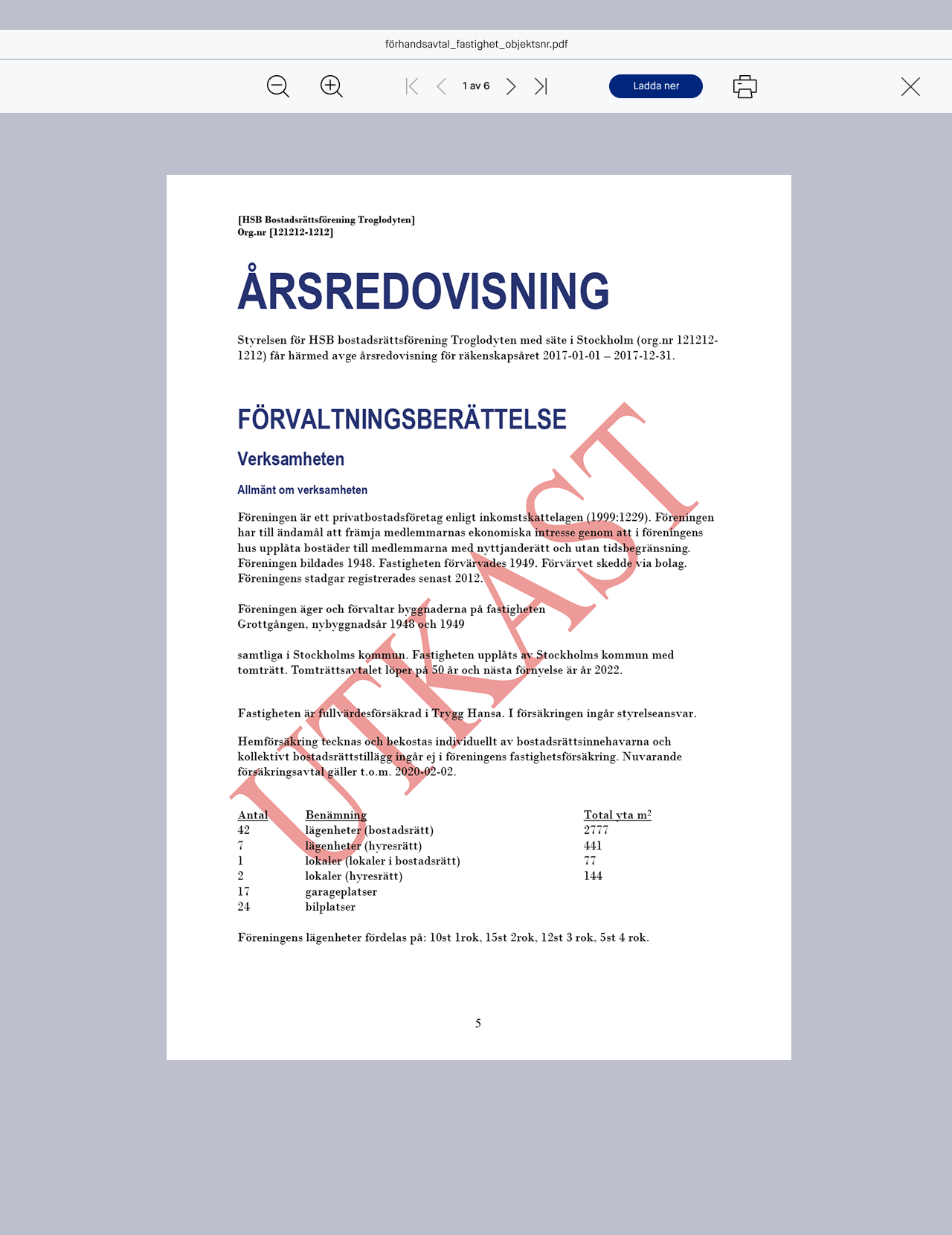
From System to Final Report
The system generates structured, print-ready outputs and stores all documents securely in HSB’s cloud service.
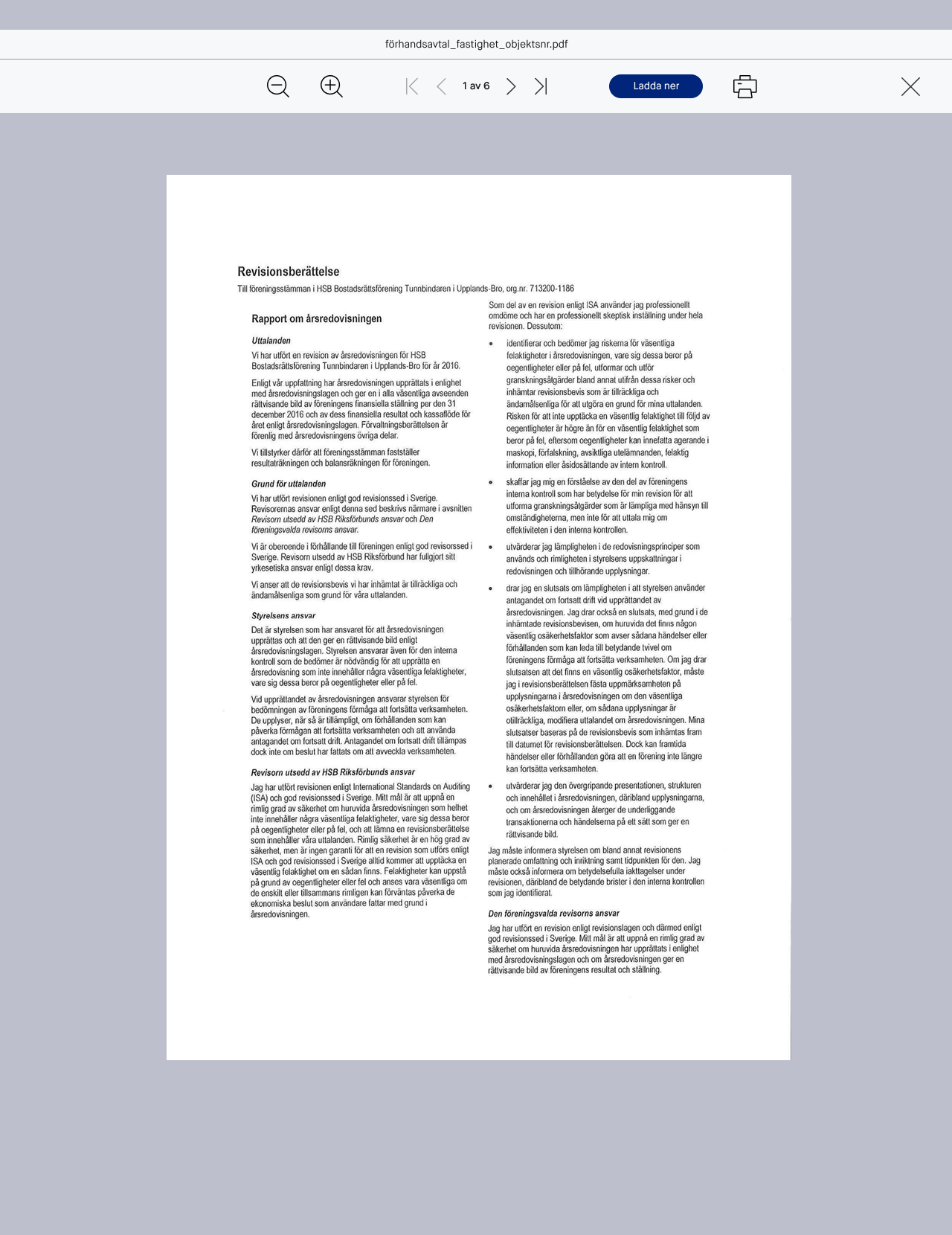
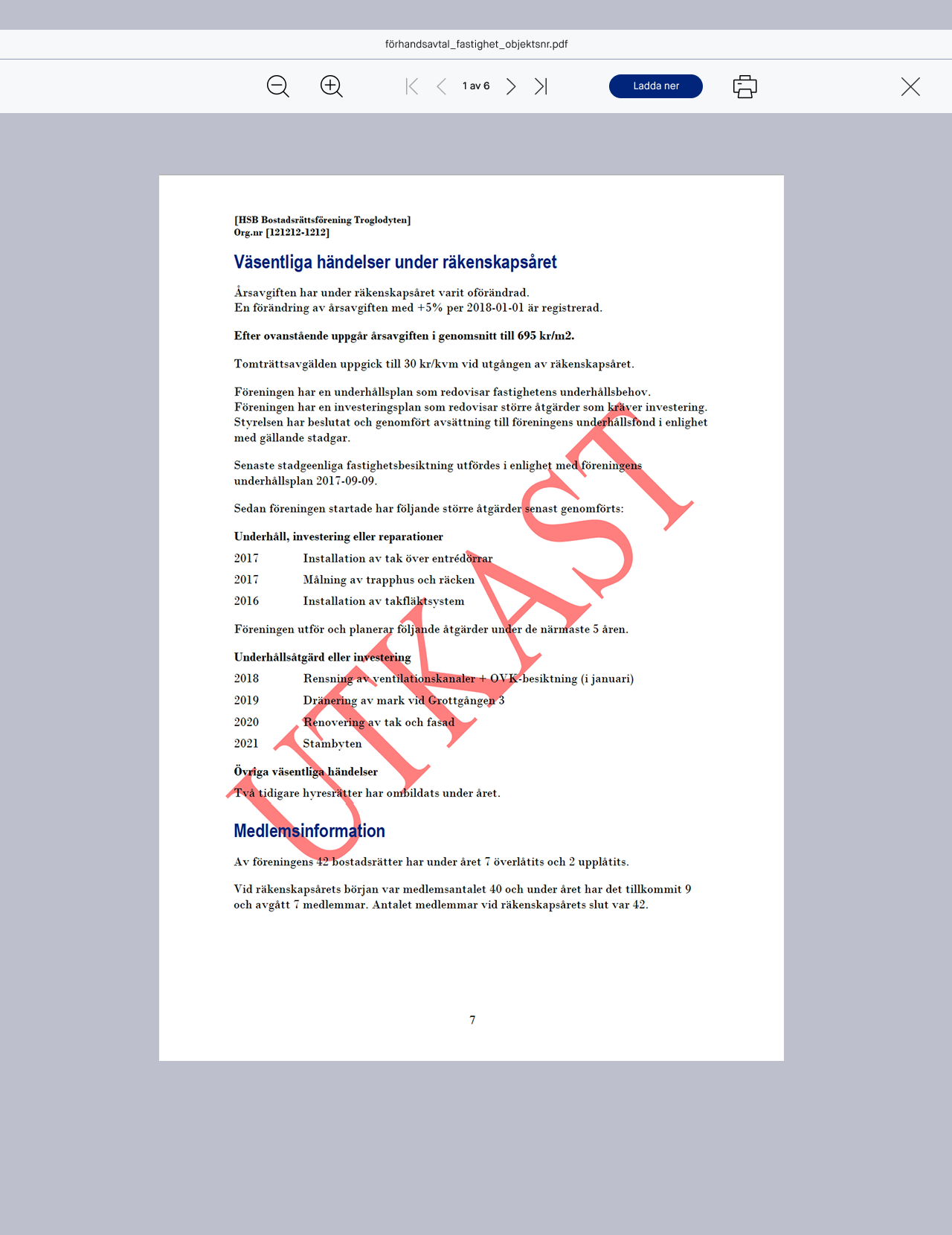
A key feature was the ability to preview the final annual report as a fully formatted PDF while working within the digital interface. Users could continuously see how their input translated into the final printed document, creating confidence and reducing the gap between drafting and delivery.
Previously, compiling the annual report was often outsourced, requiring manual coordination across multiple stakeholders and formats. With the new solution, the entire process was handled within one system, where data was structured and automatically exported into predefined PDF templates.
These templates ensured consistency, compliance, and high-quality output, making the report ready for print or distribution without additional formatting. The result was a seamless transition from digital workflow to final document, significantly reducing time, cost, and dependency on external production.
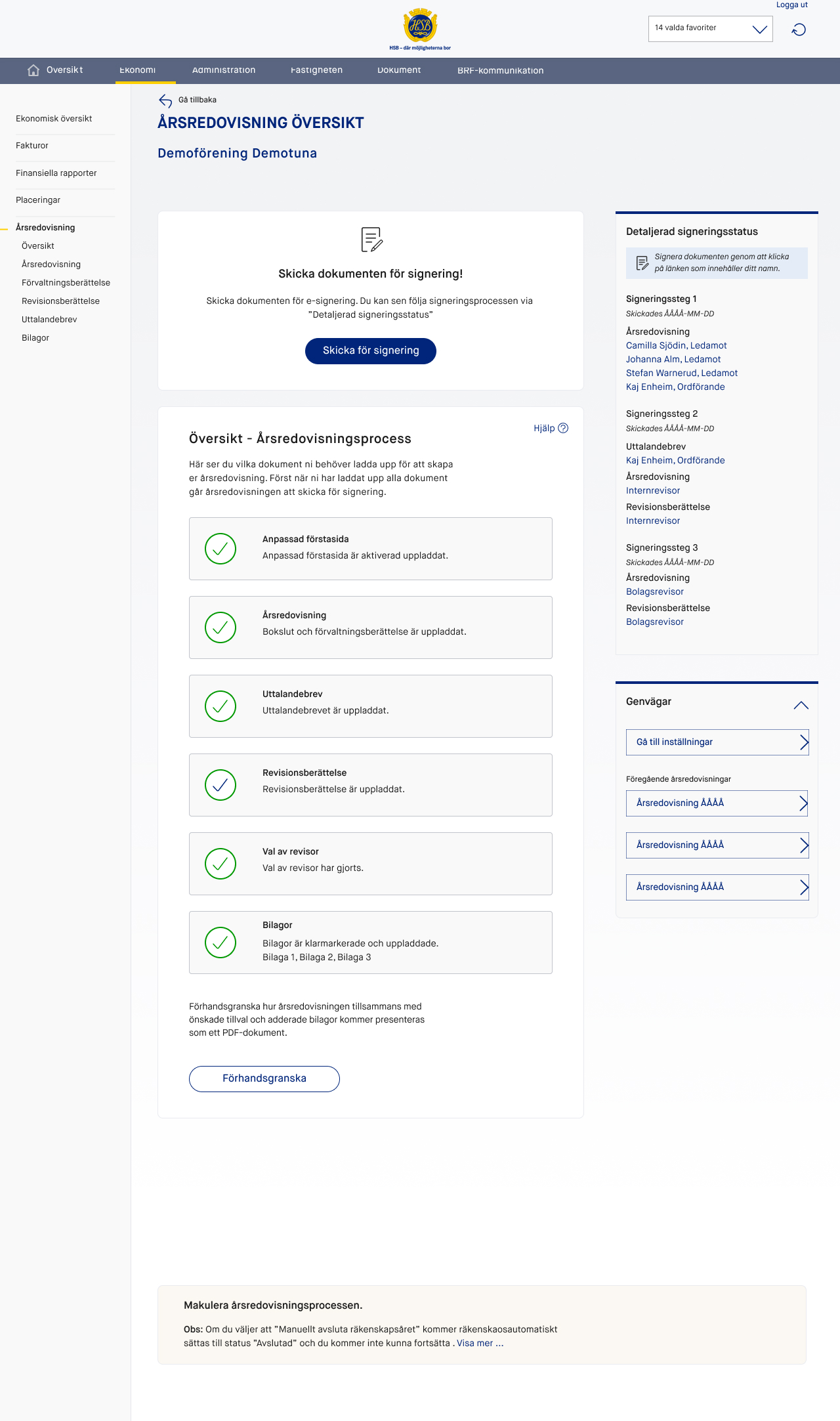
Full Transparency in Signing
The signing process was redesigned as a fully digital, transparent workflow, replacing what was previously a fragmented and opaque sequence of manual steps.
At any point in the process, users can clearly see:
- who is required to sign
- in what order signatures are collected
- what documents are included
- what is missing
- and what content is locked for further editing
This visibility removes uncertainty and eliminates the need for manual follow-ups.
The signing flow is tightly integrated into the overall process logic. Once the report reaches a defined state, it is sent for e-signing through Scrive. From there, the system manages the sequence automatically based on predefined roles and responsibilities.
The typical flow follows a structured order:
- The board reviews and finalizes the report
- Board members sign in a defined sequence
- The auditor reviews and signs once the board has completed their part
- The final signed version is locked and stored
Each step is status-driven, meaning that actions are only available when prerequisites are met. As soon as a user signs, the next stakeholder is notified and activated in the flow. If delays occur, reminders are triggered both in the system and via email.
A critical aspect of the design was ensuring that signing was not treated as a separate event, but as an integrated part of the service. The user never leaves the context of the process, and all documents, statuses, and responsibilities remain visible throughout.
Instead of relying on manual coordination and unclear status updates, the signing process became fully visible, step-based, and easy to follow for all stakeholders.
Transforming How HSB Operates
The product reduced complexity, increased efficiency, and created a structured way of working across all roles.
Reduced annual reporting lead time
Fewer manual interventions
Secure digital signing replacing postal workflows
Lower support volume
Increased traceability and audit readiness
Improved transparency between board and auditor
02
Digital Board Support
From complex regulated process to cohesive digital product
HSB needed to digitise the full board work process for housing associations — covering meeting minutes, financial closing, annual reports, and legally binding signatures. Not a single interface, but a multi-role product with legal requirements and dependencies between actors. My role was to translate business logic into a usable, scalable digital product.
Key Outcomes
- Shorter lead time for annual reports
- Fewer manual steps across the process
- Digital signing replaced postal signing
- Increased transparency between board and auditor
Digital Board Support
Transforming board work from documents into workflows
ROLE
Service Designer / UX-Designer
SCOPE
Create an fully covering board assistant system
TOOLS
Sketch, Zeplin, InVision, Pilot Testing.
STAKEHOLDERS
Product Owner, Business Stakeholders, Economists, Board Members, Auditors
Transforming board work from analog into digital workflows
A platform designed to digitise and streamline board operations for housing associations, replacing fragmented tools with a unified, structured workflow from meeting planning to protocol writing and action tracking. The platform also supports member applications and facilitates transparent communication between residents and the board.
Disconnected Systems, Limited Control
Board operations relied on fragmented tools — email, documents, spreadsheets, and manual coordination. The lack of a centralised structure made it difficult to maintain oversight, track decisions, and ensure accountability across the process.
👤 High dependency on key individuals
📋 Difficult to track actions and accountability
🔍 No central source of truth for decisions
👤 High dependency on key individuals
Reframing Board Work as a System
Instead of digitising documents, I designed a workflow-driven interface where:
-
Data is structured and reusable across meetings and protocols through "HSB Document" (Cloud)
-
Users interact with content, not files
-
Processes are guided, step-by-step, and role-based
-
Meetings, protocols, and actions are connected, no duplication, no manual tracking
Platform Architecture
The platform was structured into key modules, accessible through a persistent navigation system that enabled users to move seamlessly between planning, execution, and follow-up.
➕
Cretate meeting
Define time, location, participants, and attach preparatory documents
📅
Meeting overview
Central hub showing upcoming and past meetings with status indicators
📝
Agenda & Case Management
Structured agenda with predefined sections and reusable templates
✍️
Protocoll Editor
Interactive editor with structured sections per agenda item — not a document, a workflow
✅
Action List
Task management linked to meetings and protocols with status tracking
📆
Board Calender
Yearly planning view for governance milestones and meeting schedules
🏛️
Nominations & Governance
Structured processes for board nominations and governance documentation
💬
Contact & Incoming Motions
Simplified contact and incoming motions from members to board.
🏠
Subleasing
Digitized second-hand rental applications into structured cases with notifications and documents.
Key Flows
01Efficiency
Streamlining digital workflows reduced manual effort significantly, freeing teams to
focus on strategic decisions rather than administrative overhead.
02
Accessibility
Designing inclusive interfaces ensured that board members and stakeholders of all technical backgrounds could engage confidently with complex financial data.
03
Transparency
Clear information architecture and visual communication made governance data understandable and trustworthy to HSB members across Sweden.
alexander.parling@gmail.com | + 46761712672